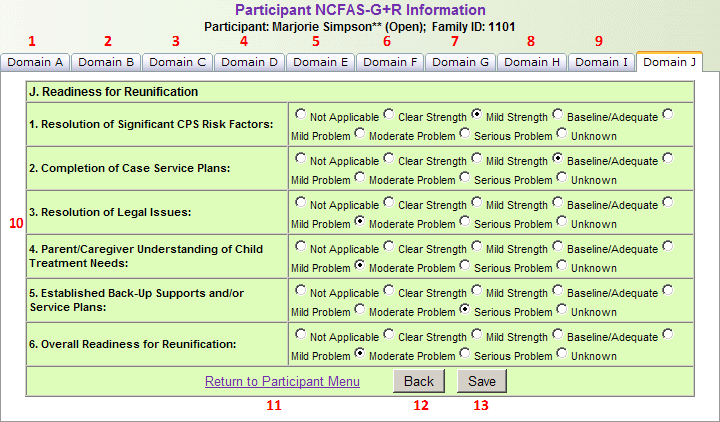
The North Carolina Family Assessment Scale for General Service and Reunification (NCFAS-G+R) information section is used to add or update North Carolina Family Assessment Scale for General Service and Reunification (NCFAS-G+R) information. The NCFAS-G+R section has ten tabs:
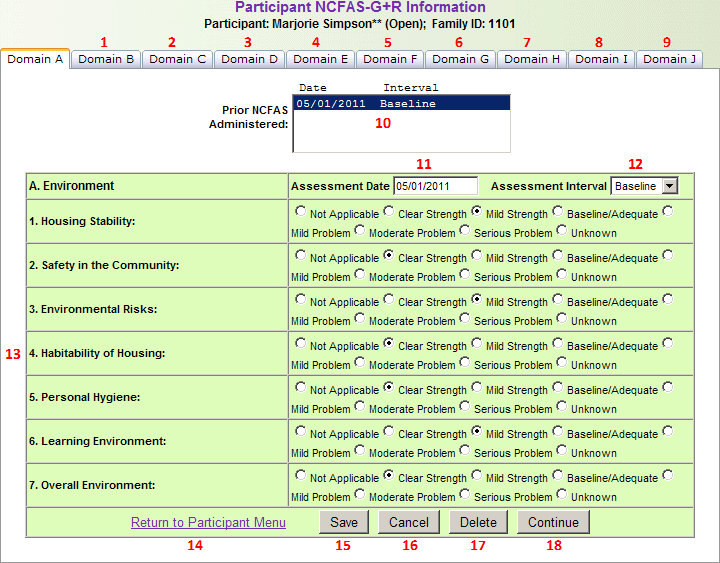
- Domain A
- Domain B: Switches to the Domain B tab.
- Domain C: Switches to the Domain C tab.
- Domain D: Switches to the Domain D tab.
- Domain E: Switches to the Domain E tab.
- Domain F: Switches to the Domain F tab.
- Domain G: Switches to the Domain G tab.
- Domain H: Switches to the Domain H tab.
- Domain I: Switches to the Domain I tab.
- Domain J: Switches to the Domain J tab.
- Prior NCFAS Administered: Lists all NCFAS administrations entered. To update an existing NCFAS administration, select it from this list.
- Assessment Date: Enter or select the assessment date.
- Assessment Interval: Select the assessment interval from the drop-down list.
- A. Environment: Select the response for each item in Domain A.
- Return to Participant Menu: Return to the Participant Menu without saving any changes.
- Save: Save all NCFAS information entered.
- Cancel: Cancel any unsaved changes.
- Delete: Delete the selected NCFAS administration.
- Continue: Continue to the Domain B tab.
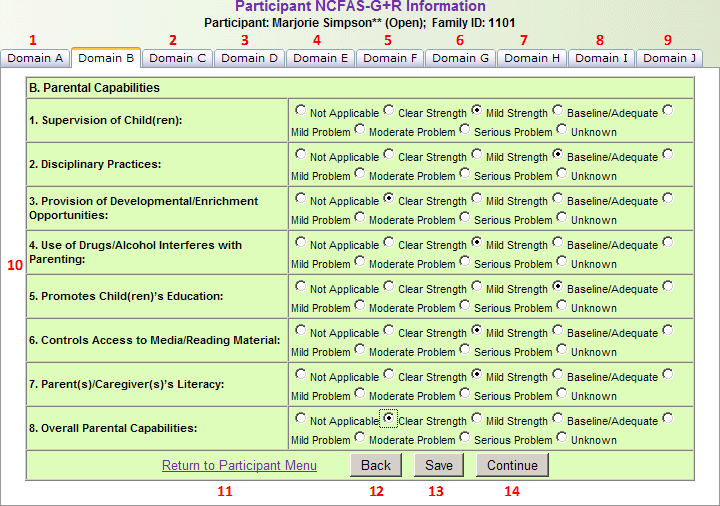
- Domain B
- Domain A: Switches to the Domain A tab.
- Domain C: Switches to the Domain C tab.
- Domain D: Switches to the Domain D tab.
- Domain E: Switches to the Domain E tab.
- Domain F: Switches to the Domain F tab.
- Domain G: Switches to the Domain G tab.
- Domain H: Switches to the Domain H tab.
- Domain I: Switches to the Domain I tab.
- Domain J: Switches to the Domain J tab.
- Parental Capabilities: Select the response for each item in Domain B.
- Return to Participant Menu: Return to the Participant Menu without saving any changes.
- Back: Return to the Domain A tab.
- Save: Save all NCFAS information entered.
- Continue: Continue to the Domain C tab.
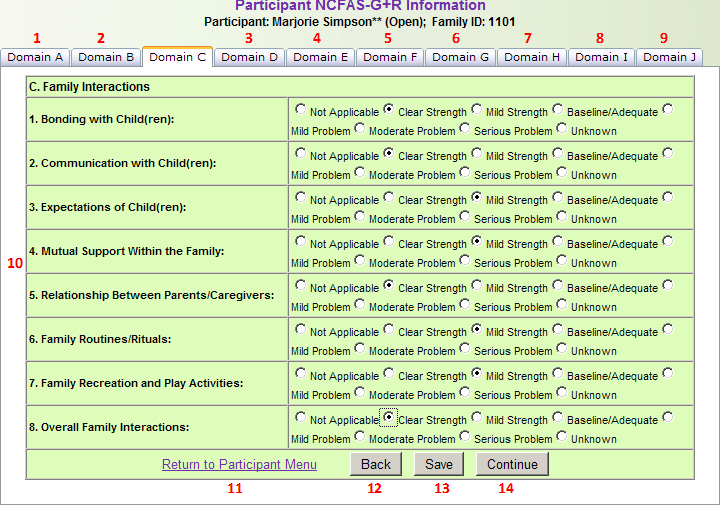
- Domain C
- Domain A: Switches to the Domain A tab.
- Domain B: Switches to the Domain B tab.
- Domain D: Switches to the Domain D tab.
- Domain E: Switches to the Domain E tab.
- Domain F: Switches to the Domain F tab.
- Domain G: Switches to the Domain G tab.
- Domain H: Switches to the Domain H tab.
- Domain I: Switches to the Domain I tab.
- Domain J: Switches to the Domain J tab.
- Family Interactions: Select the response for each item in Domain C.
- Return to Participant Menu: Return to the Participant Menu without saving any changes.
- Back: Return to the Domain B tab.
- Save: Save all NCFAS information entered.
- Continue: Continue to the Domain D tab.
- Domain D
- Domain A: Switches to the Domain A tab.
- Domain B: Switches to the Domain B tab.
- Domain C: Switches to the Domain C tab.
- Domain E: Switches to the Domain E tab.
- Domain F: Switches to the Domain F tab.
- Domain G: Switches to the Domain G tab.
- Domain H: Switches to the Domain H tab.
- Domain I: Switches to the Domain I tab.
- Domain J: Switches to the Domain J tab.
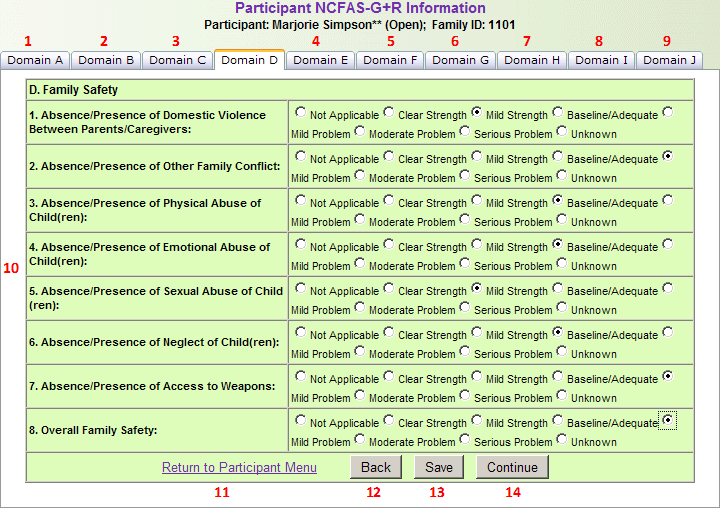
- Family Safety: Select the response for each item in Domain D.
- Return to Participant Menu: Return to the Participant Menu without saving any changes.
- Back: Return to the Domain C tab.
- Save: Save all NCFAS information entered.
- Continue: Continue to the Domain E tab.
- Domain E
- Domain A: Switches to the Domain A tab.
- Domain B: Switches to the Domain B tab.
- Domain C: Switches to the Domain C tab.
- Domain D: Switches to the Domain D tab.
- Domain F: Switches to the Domain F tab.
- Domain G: Switches to the Domain G tab.
- Domain H: Switches to the Domain H tab.
- Domain I: Switches to the Domain I tab.
- Domain J: Switches to the Domain J tab.
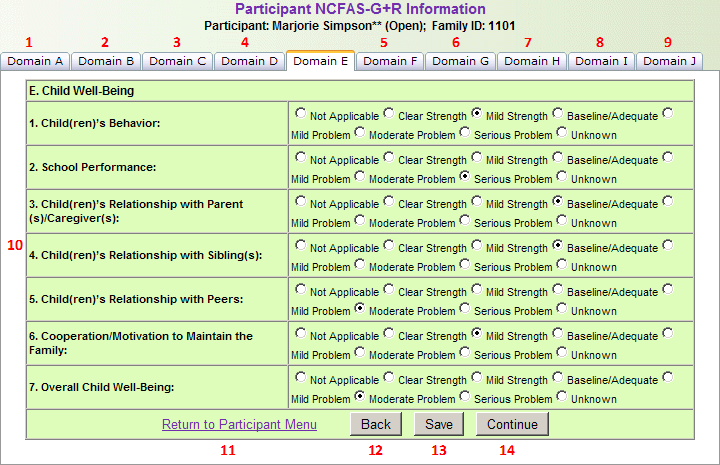
- Child Well-Being: Select the response for each item in Domain E.
- Return to Participant Menu: Return to the Participant Menu without saving any changes.
- Back: Return to the Domain D tab.
- Save: Save all NCFAS information entered.
- Continue: Continue to the Domain F tab.
- Domain F
- Domain A: Switches to the Domain A tab.
- Domain B: Switches to the Domain B tab.
- Domain C: Switches to the Domain C tab.
- Domain D: Switches to the Domain D tab.
- Domain E: Switches to the Domain E tab.
- Domain G: Switches to the Domain G tab.
- Domain H: Switches to the Domain H tab.
- Domain I: Switches to the Domain I tab.
- Domain J: Switches to the Domain J tab.
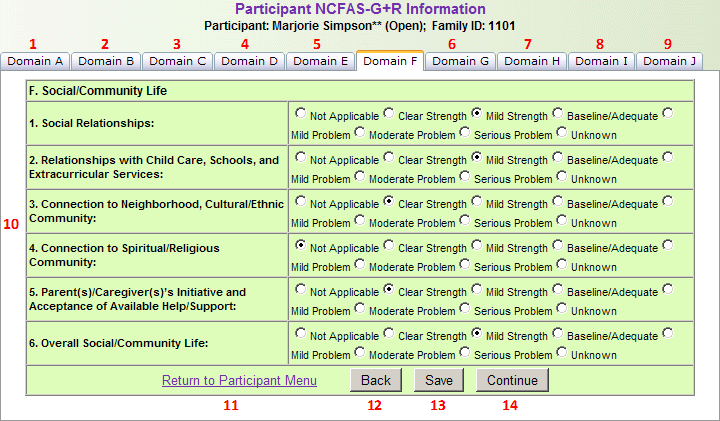
- Social/Community Life: Select the response for each item in Domain F.
- Return to Participant Menu: Return to the Participant Menu without saving any changes.
- Back: Return to the Domain E tab.
- Save: Save all NCFAS information entered.
- Continue: Continue to the Domain G tab.
- Domain G
- Domain A: Switches to the Domain A tab.
- Domain B: Switches to the Domain B tab.
- Domain C: Switches to the Domain C tab.
- Domain D: Switches to the Domain D tab.
- Domain E: Switches to the Domain E tab.
- Domain F: Switches to the Domain F tab.
- Domain H: Switches to the Domain H tab.
- Domain I: Switches to the Domain I tab.
- Domain J: Switches to the Domain J tab.
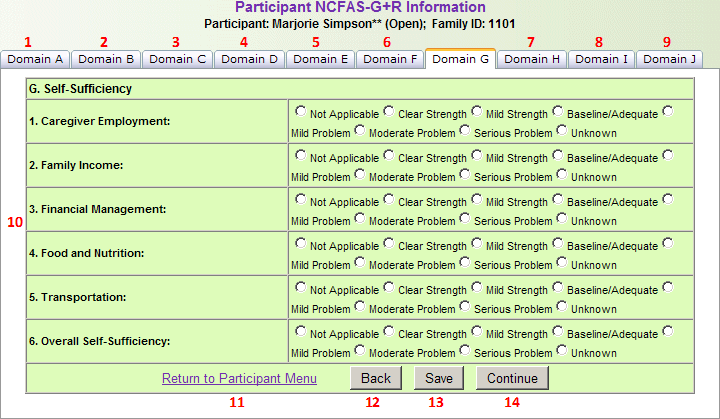
- Self-Sufficiency: Select the response for each item in Domain G.
- Return to Participant Menu: Return to the Participant Menu without saving any changes.
- Back: Return to the Domain F tab.
- Save: Save all NCFAS information entered.
- Continue: Continue to the Domain H tab.
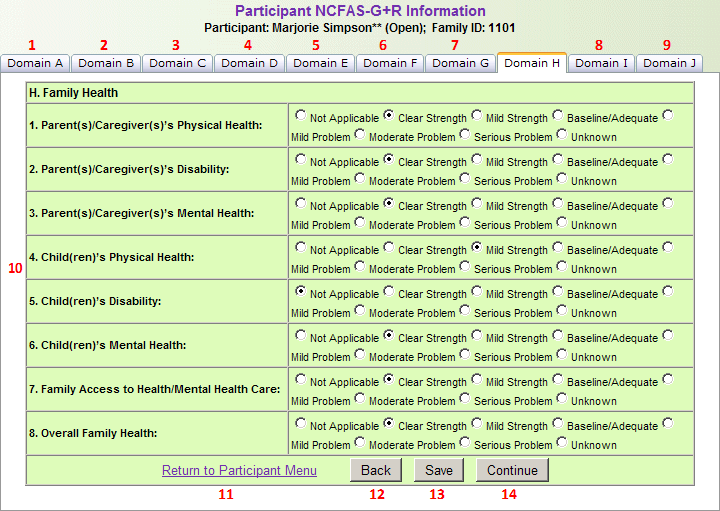
- Domain H
- Domain A: Switches to the Domain A tab.
- Domain B: Switches to the Domain B tab.
- Domain C: Switches to the Domain C tab.
- Domain D: Switches to the Domain D tab.
- Domain E: Switches to the Domain E tab.
- Domain F: Switches to the Domain F tab.
- Domain G: Switches to the Domain G tab.
- Domain I: Switches to the Domain I tab.
- Domain J: Switches to the Domain J tab.
- Family Health: Select the response for each item in Domain H.
- Return to Participant Menu: Return to the Participant Menu without saving any changes.
- Back: Return to the Domain G tab.
- Save: Save all NCFAS information entered.
- Continue: Continue to the Domain I tab.
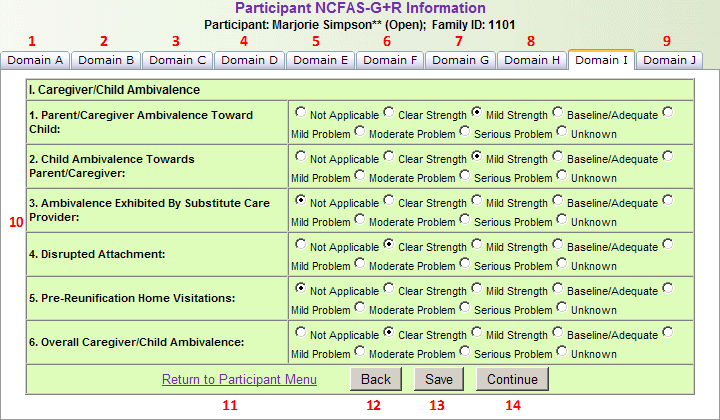
- Domain I
- Domain A: Switches to the Domain A tab.
- Domain B: Switches to the Domain B tab.
- Domain C: Switches to the Domain C tab.
- Domain D: Switches to the Domain D tab.
- Domain E: Switches to the Domain E tab.
- Domain F: Switches to the Domain F tab.
- Domain G: Switches to the Domain G tab.
- Domain H: Switches to the Domain H tab.
- Domain J: Switches to the Domain J tab.
- Caregiver/Child Ambivalence: Select the response for each item in Domain I.
- Return to Participant Menu: Return to the Participant Menu without saving any changes.
- Back: Return to the Domain H tab.
- Save: Save all NCFAS information entered.
- Continue: Continue to the Domain J tab.
- Domain J
- Domain A: Switches to the Domain A tab.
- Domain B: Switches to the Domain B tab.
- Domain C: Switches to the Domain C tab.
- Domain D: Switches to the Domain D tab.
- Domain E: Switches to the Domain E tab.
- Domain F: Switches to the Domain F tab.
- Domain G: Switches to the Domain G tab.
- Domain H: Switches to the Domain H tab.
- Domain I: Switches to the Domain I tab.
- Readiness for Reunification: Select the response for each item in Domain J.
- Return to Participant Menu: Return to the Participant Menu without saving any changes.
- Back: Return to the Domain I tab.
- Save: Save all NCFAS information entered.
The first tab contains assessment records and Domain A information.
The second tab contains Domain B information.
The third tab contains Domain C information.
The fourth tab contains Domain D information.
The fifth tab contains Domain E information.
The sixth tab contains Domain F information.
The seventh tab contains Domain G information.
The eighth tab contains Domain H information.
The ninth tab contains Domain I information.
The tenth tab contains Domain J information.